About Continuous Forecasts
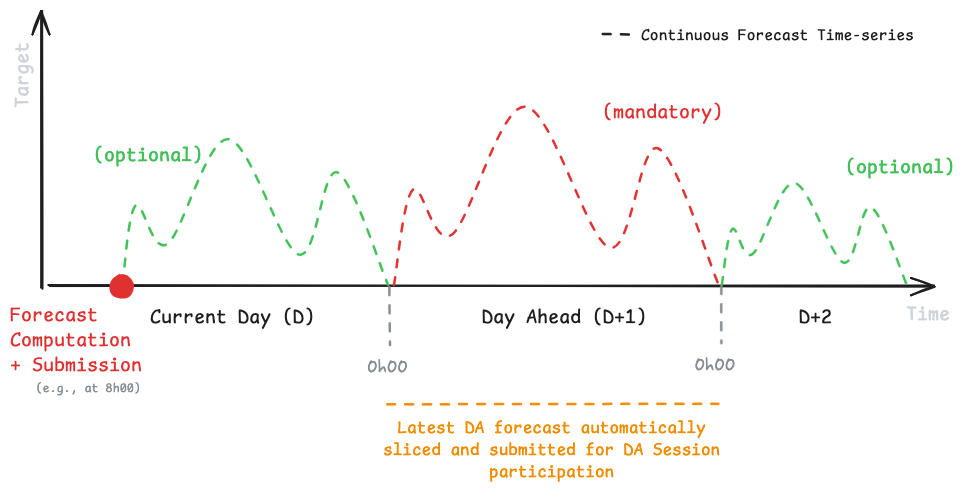
After downloading the raw measurements data, forecasters can now prepare and submit Continuous Forecasts that are not tied in advance to any market session. Predico will automatically slice the series into the appropriate sessions and apply your latest values to each one.
This feature is designed to simplify the forecasting process and provide more flexibility for forecasters. By allowing you to submit a single forecast that covers multiple sessions, you can focus on improving your forecasting models without worrying about session boundaries, which also moves us closer to full intraday forecasting.
Note
The existing session-specific API endpoint will remain available, so current integrations will continue to work. If you prefer to keep submitting separate forecasts per session, you may do so.
How does it work?
A single time series spans multiple sessions; Predico slices it into per-session submissions at each gate closure. Requirements:
| Requirement | Value |
|---|---|
| Format | JSON, one request per variable (q10, q50, q90). |
| Granularity | 15 minutes. |
| Continuity | No gaps between the first and last timestamp. |
| Horizon | Flexible, up to 10 days (240 h) ahead; must cover at least the full day-ahead (24 h) window. |
| Quantile ordering | Q10 ≤ Q50 ≤ Q90 at every timestamp (strongly recommended — crossing quantiles hurt MWI). |
| Eligibility | All three quantiles required to be considered for rewards. |
The API validates on submission and returns HTTP 400 with a descriptive
message on invalid data.
Below you can find an illustration of a potential continuous forecast, launched and submitted at 8h00 CET for the next hours. Note the mandatory period that will later be used by Predico's internal algorithms to create a Session Forecast , on your behalf.
Important
- You have the flexibility to submit multiple forecasts for the same time period. However, only the most recent forecast will be considered for market participation at sessions gate-closure.
- Upon gate-closure, a Session Forecast will be created on your behalf (by Predico), which you will also be able to query and inspect via the Listing Session Submissions endpoints.
Continuous forecasts and qualification
Each gate-closure slice of your continuous forecast is treated as a submission to that session. For Intraday qualification, your continuous series must produce a slice at every gate closure that needs to count; for D+1 / D+N, your series must produce a slice for every opened session of the target day. See Evaluation.
Preparing a Continuous Forecast
Note
- Example Purpose: This example demonstrates preparing a 72-hour forecast submission with 15-minute interval samples using random data. Replace this with your forecasting model for actual use.
- Quantiles: The example submission includes values for three variables, specifically 'quantiles' 10, 50, and 90.
Prerequisites
- Python Environment: Ensure you have Python installed with the necessary libraries (
pandas,numpy,requests). - Access Token: A valid access token is required for authentication. Refer to the Authentication section if needed.
Change this submission!
In this example, our submission will be exclusively composed by random samples.
However, you should prepare your model based on the raw measurements data for the challenge resource (see
Downloading Raw Data section), and any external information sources you might have access to.
Start by retrieving our internal identifier for the target resource. You can use the resource name to retrieve this information from our API (later you can save this in local storage).
# Challenge resource name.
resource_name = "wind_farm_1"

# Get challenges target resource identifier (UUID)
# (this is also available via the /market/challenge/ endpoint )
response = requests.get(
    url=f"{API_URL}/user/resource",
    params={'resource_name': resource_name},
    headers=headers,
    timeout=30
)

# Check if the request was successful
if response.status_code == 200:
    resources = response.json()
else:
    print("Failed to retrieve resource data.")
    print(f"Status code: {response.status_code}")
    exit()

# Get resource ID (UUID):
resource_id = resources["data"][0]["id"]
print("Resource ID:", resource_id)
Then, prepare your forecasts. In this example we will use synthetic data but you should use your own models to produce forecasts here. Note that you will need to create a payload per forecasted variable (i.e., q10, q50 and q90).
# Create a random 72h submission (random values):
# Generate datetime values for the challenge period:
start_datetime = dt.datetime.now(dt.timezone.utc) + dt.timedelta(hours=1)  # from 1h ahead from now
end_datetime = start_datetime + dt.timedelta(hours=71) # to 71h ahead

# Ensure we only work with quarter-hourly intervals
start_datetime = start_datetime.replace(minute=0, second=0, microsecond=0)
end_datetime = end_datetime.replace(minute=0, second=0, microsecond=0)

# Generate a range of datetime values with 15-minute intervals
datetime_range = pd.date_range(start=start_datetime,
                               end=end_datetime,
                               freq='15min')
datetime_range = [x.strftime("%Y-%m-%dT%H:%M:%SZ") for x in datetime_range]
# Generate random Q50 (median) values, then derive Q10/Q90 around it so that
# Q10 <= Q50 <= Q90 holds at every timestamp (as required by the API).
q50 = np.random.uniform(low=0.1, high=0.9, size=len(datetime_range))
quantile_values = {
    "q10": [round(float(x), 3) for x in np.clip(q50 - 0.1, 0.0, 1.0)],
    "q50": [round(float(x), 3) for x in q50],
    "q90": [round(float(x), 3) for x in np.clip(q50 + 0.1, 0.0, 1.0)],
}

# Prepare submissions for the three quantiles Q10, Q50, Q90:
submission_list = []
for qt in ["q50", "q10", "q90"]:
    qt_forec = pd.DataFrame({
        'datetime': datetime_range,
        'value': quantile_values[qt],
    })
    submission_list.append({
        "variable": qt,
        "forecasts": qt_forec.to_dict(orient="records")
    })